
Overview
ModSecurity is a Web Application Firewall (WAF) in Webuzo that protects your website from attacks like SQL injection and XSS by filtering and monitoring incoming traffic.
Navigate to Home > Security > ModSecurity Configuration
Configuration (Step-by-Step):
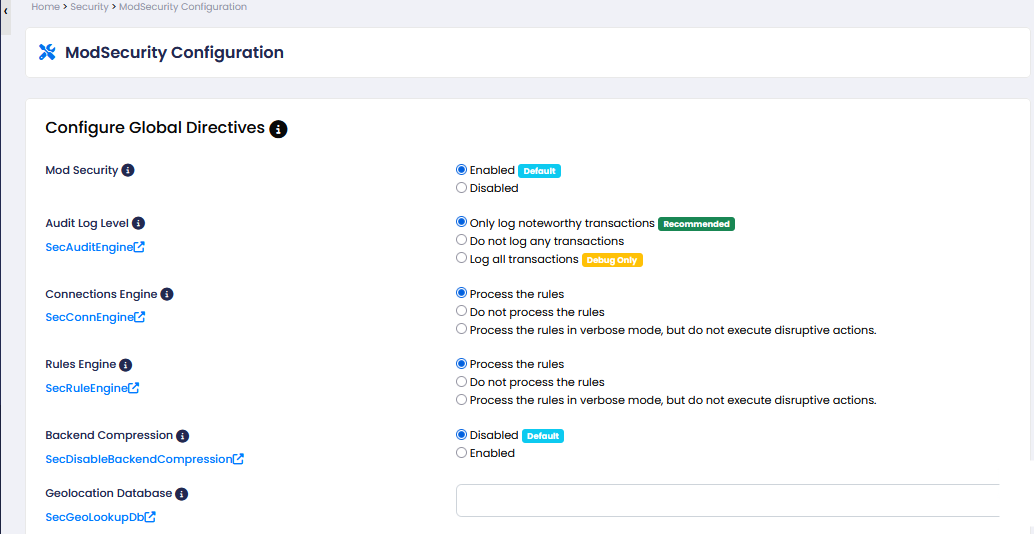
ModSecurity: Enable or disable the firewall. (Recommended: Enabled)
When enabled, the firewall actively monitors and blocks malicious requests. If disabled, no protection is applied and all traffic passes through.
Audit Log Level: Choose how much activity to log. (Recommended: Log only important transactions)
Controls how much activity is recorded. Higher logging (like “log all”) records every request, while lower logging only saves important or suspicious activity.
Connections Engine: Controls request processing. (Recommended: Process the rules)
When enabled (process rules), incoming requests are checked against security rules. If disabled, requests are not inspected at all.
Rules Engine: Decides whether to block attacks or just detect them. (Recommended: Process the rules)
When enabled, detected threats are blocked. In detection mode, threats are only logged but not blocked. If disabled, rules are not applied.
Backend Compression: Enable or disable compression. (Recommended: Disabled)
When enabled, responses may be compressed which can affect how ModSecurity inspects data. Disabled keeps things simpler and more compatible.
Geolocation Database: Add GeoIP database path for country-based filtering.
When configured, it allows the firewall to identify user locations and apply country-based restrictions. Without it, location-based filtering won’t work.
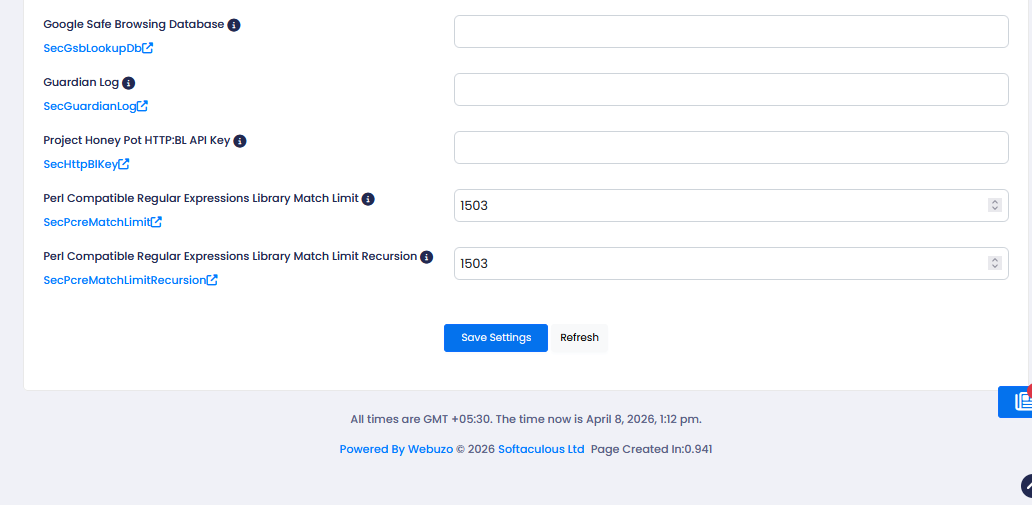
Google Safe Browsing Database: Configure to detect malicious/phishing URLs.
When enabled/configured, it helps detect and block requests related to known malicious or phishing URLs. If not set, this protection is not used.
Guardian Log: Enable logging for external security tools.
When enabled, logs can be shared with external security tools for advanced monitoring. If disabled, logs stay local only.
Project Honey Pot HTTPBL API Key: Add API key to detect spam bots and bad IPs.
When added, it helps detect spam bots and known bad IPs using an external database. Without it, this extra layer of protection is not active.
Perl Compatible Regular Expressions Library Match Limit: Set regex processing limit. (Default: 1503)
Defines how much processing is allowed for pattern matching. Lower values improve performance but may miss complex matches; higher values allow deeper inspection.
Perl Compatible Regular Expressions Library Match Limit Recursion: Set recursion limit for regex. (Default: 1503)
Controls how deep recursive pattern checks can go. Lower values reduce server load; higher values allow more complex rule evaluation.
Click Save Settings to apply changes.