Overview
The Import / Export Settings feature allows you to backup your current settings or restore settings from a previously saved file.
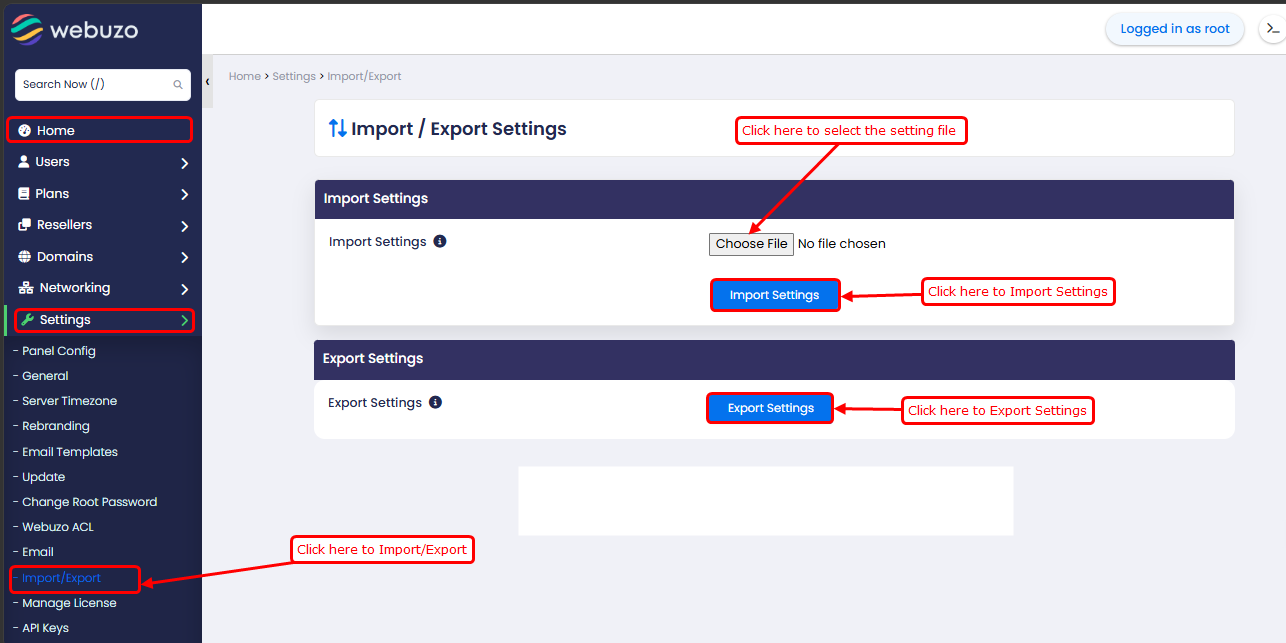
Home > Settings > Import/Export
Import settings:
This option allows you to restore settings from a file.
Click Browse and select the settings file from your system
Click Import Settings to apply the configuration
Export Settings:
This option allows you to download the current server settings.
Click Export Settings
A file containing the current configuration will be downloaded
This export includes Webuzo/EMPS configuration files such as Nginx, PHP, PHP-FPM, service startup, proxy security, gzip, domain mapping, terminal config, and application access/location settings for features like Softaculous, Backuply, AWStats, pgAdmin4, Simuzo, GitWeb, and CSF.