
Overview
The ModSecurity Rules section allows you to view, search, manage, and control security rules applied to your server.
This page displays a list of all ModSecurity rules along with options to filter, search, add, and manage them.
Procedure
Navigate to Home > Security > ModSecurity Rules
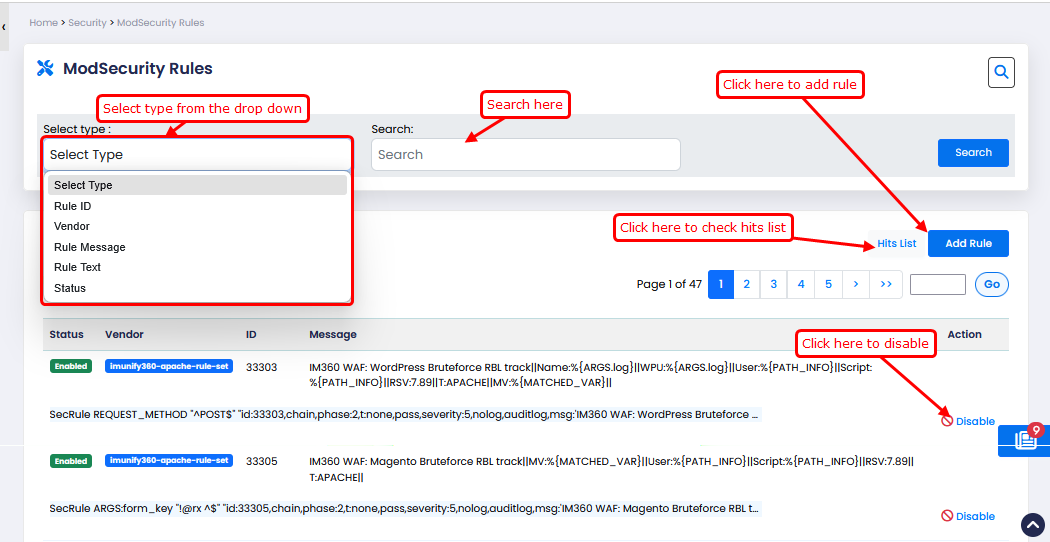
Use the Select Type dropdown to filter rules based on specific criteria:
Rule ID – Search rules using their unique ID
Vendor – Filter rules by provider (e.g., Imunify360)
Rule Message – Search using rule description
Rule Text – Filter using full rule content
Status – Show Enabled/Disabled rules
Search Box:
Enter your keyword based on the selected filter type
Click Search to display matching results
Add Rule Button:
Click Add Rule to create a new ModSecurity rule
You will be prompted to enter rule details
Hits List:
Click Hits List to view logs of triggered rules
Shows how many times a rule has been activated
Rules Table:
The table displays all available rules with the following details:
Status – Shows if the rule is Enabled or Disabled
Vendor – Rule provider (e.g., imunify360-apache-rule-set)
ID – Unique Rule ID
Message – Description of the rule