
Mail Setting
Overview
Exim Configuration Manager that allows system administrators to manage and customize the Exim mail server—the default Mail Transfer Agent (MTA)It provides an accessible and structured way to control how Exim handles sending, receiving, and processing emails on the server.
This tab displays all available settings. To filter the displayed settings, select a category tab. You can also use the Find text box to search for a specific Basic Editor setting.
Basic Editor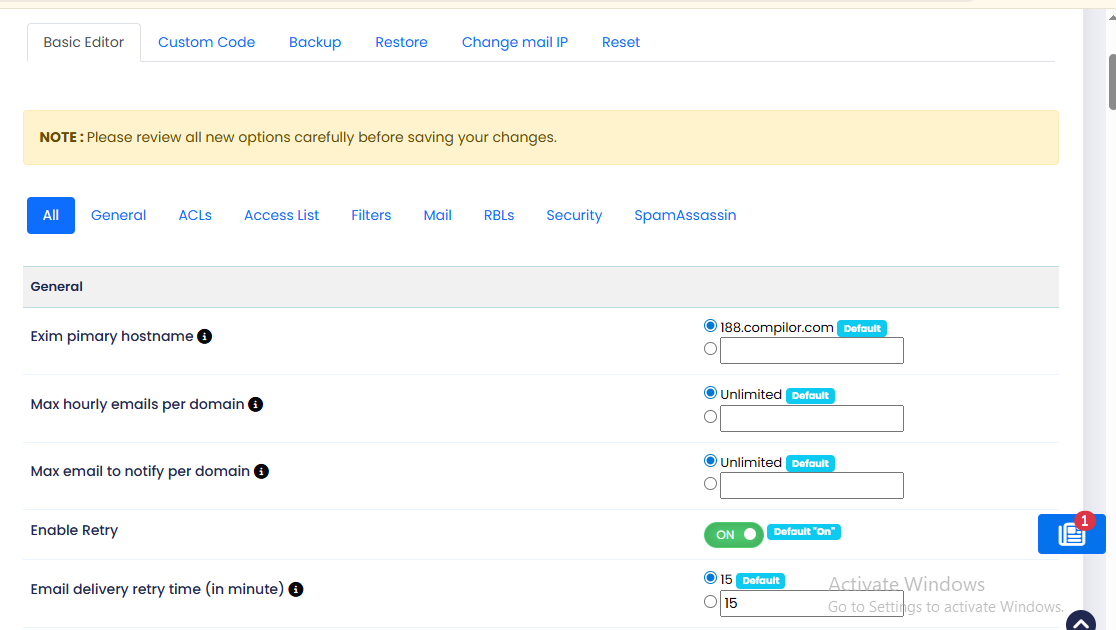
Exim pimary hostname→ Defines the server hostname used by Exim while sending emails
Max hourly emails per domain→ Limits how many emails a single domain can send per hour to prevent spam abuse.
Max email to notify per domain→ Sets the maximum number of notification emails generated for a domain.
Enable Retry→ Allows Exim to retry sending emails automatically if delivery initially fails.
Email delivery retry time (in minute)→ Specifies the time interval before Exim retries failed email deliveries
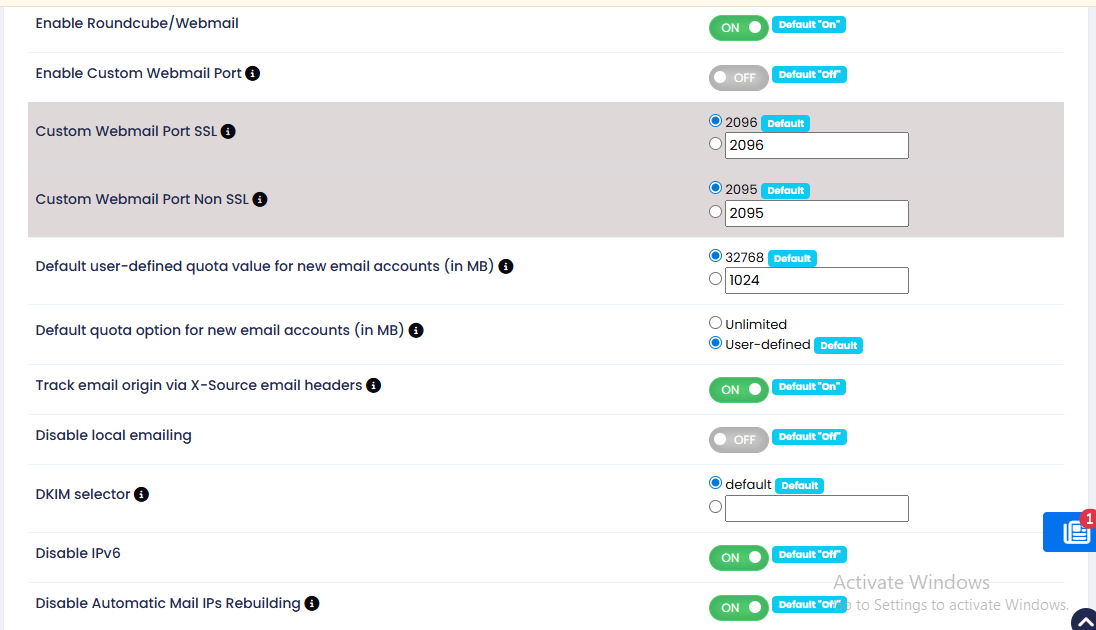
Enable Roundcube/Webmail→ Enables or disables the Roundcube webmail interface for accessing emails via browser.
Enable Custom Webmail Port→ Allows webmail to run on user-defined ports instead of default ports.
Custom Webmail Port SSL→ Defines the secure (HTTPS/SSL) port used to access webmail.
Custom Webmail Port Non SSL→ Defines the non-secure (HTTP) port used to access webmail.
Default user-defined quota value for new email accounts (in MB)→ Sets the default mailbox storage size assigned to newly created email accounts.
Default quota option for new email accounts (in MB)→ Defines whether new email accounts use unlimited storage or a predefined quota.
Track email origin via X-Source email headers→ Adds headers to outgoing emails to identify the originating user/script/server source.
Disable local emailing→ Prevents email communication between local domains hosted on the same server.
DKIM selector→ Specifies the DKIM selector name used for email authentication and DNS DKIM records.
Disable IPv6→ Disables IPv6 usage for mail services and forces communication over IPv4 only.
Disable Automatic Mail IPs Rebuilding→ Prevents automatic regeneration or rebuilding of mail server IP configuration
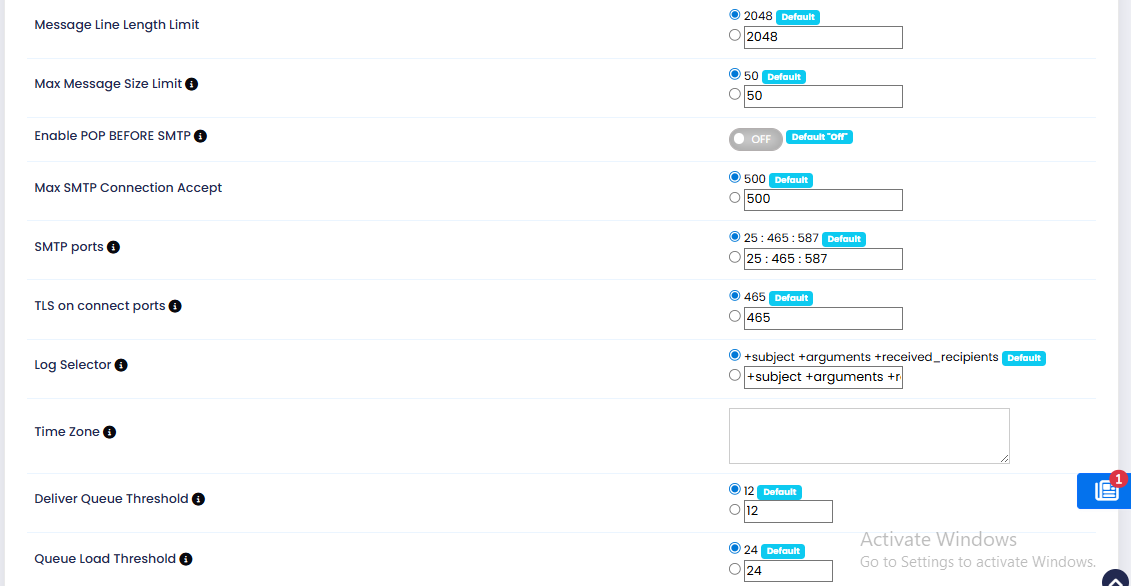
Message Line Length Limit→ Defines the maximum allowed character length for each line in an email message.
Max Message Size Limit→ Sets the maximum allowed size for sending or receiving email messages.
Enable POP BEFORE SMTP→ Allows SMTP sending only after successful POP authentication from the same client.
Max SMTP Connection Accept→ Defines the maximum number of simultaneous SMTP connections the mail server can accept.
SMTP ports→ Specifies the ports on which the SMTP service listens for incoming and outgoing mail connections.
TLS on connect ports→ Defines SMTP ports that require SSL/TLS encryption immediately upon connection.
Log Selector→ Determines which email transaction details are recorded in Exim mail logs.
Time Zone→ Sets the server time zone used for mail logs, timestamps, and scheduling operations.
Deliver Queue Threshold→ Specifies the system load limit below which Exim will attempt to deliver queued emails.
Queue Load Threshold→ Defines the system load level at which email queue processing is restricted to prevent overload.
Acls
The ACL (Access Control List) Options allow you to restrict who can send mail to your server. These settings help reduce bandwidth usage, block spam, and prevent emails with forged sender addresses (spoofed emails).
Note: Any email rejected at SMTP time will be discarded by the system.
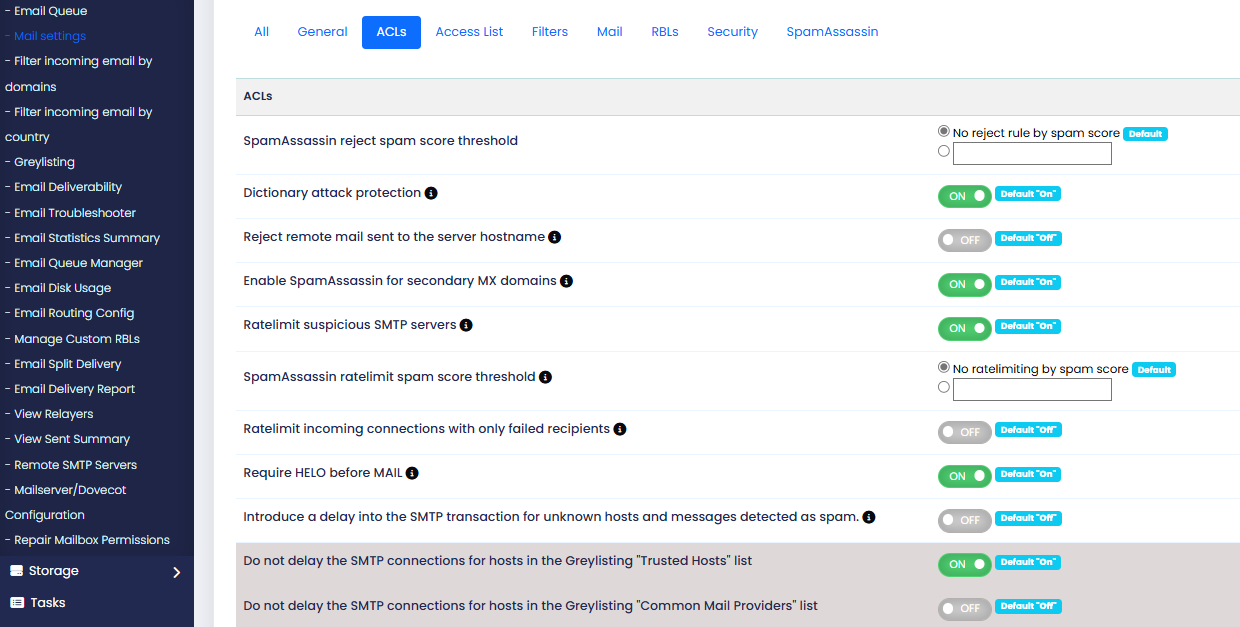
SpamAssassin reject spam score threshold→ Rejects incoming emails automatically if their SpamAssassin score exceeds the defined limit.
Dictionary attack protection→ Protects the mail server from brute-force attacks targeting multiple email addresses.
Reject remote mail sent to the server hostname→ Blocks emails sent directly to the server hostname instead of valid hosted domains.
Enable SpamAssassin for secondary MX domains→ Applies SpamAssassin filtering to domains configured as secondary mail exchangers (backup MX).
Ratelimit suspicious SMTP servers→ Limits email sending rate from SMTP servers identified as suspicious to reduce spam activity.
SpamAssassin ratelimit spam score threshold→ Applies rate limiting when emails exceed a specified SpamAssassin score.
Ratelimit incoming connections with only failed recipients→ Restricts connections that repeatedly attempt delivery to non-existent email addresses.
Require HELO before MAIL→ Forces SMTP clients to send a valid HELO/EHLO command before email transmission begins.
Introduce a delay into the SMTP transaction for unknown hosts and messages detected as spam.→ Adds a delay during SMTP communication to slow down suspected spam senders.
Do not delay the SMTP connections for hosts in the Greylisting "Trusted Hosts" list
→ Bypasses greylisting delays for trusted mail servers to allow immediate delivery.
Do not delay the SMTP connections for hosts in the Greylisting "Common Mail Providers" list→ Skips greylisting delays for well-known mail providers to ensure faster email delivery.
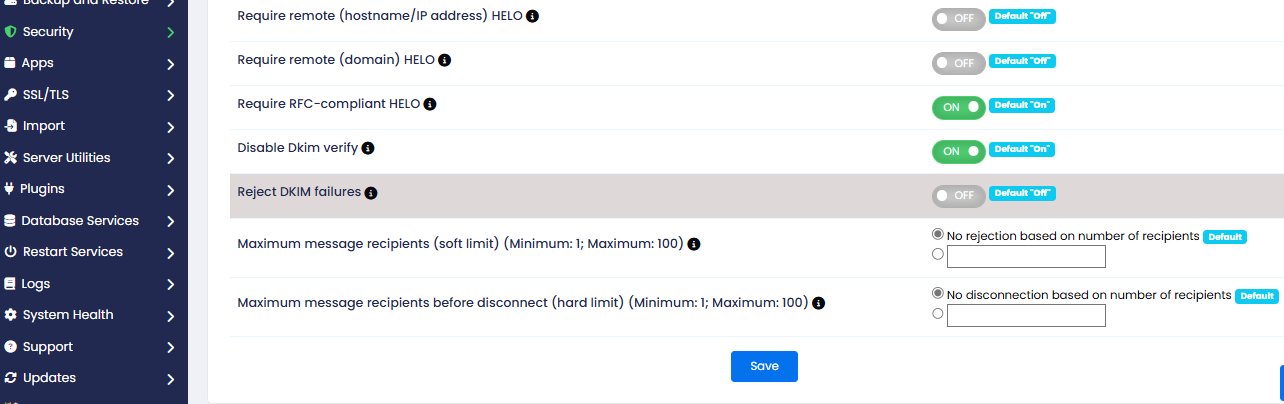
Require remote (hostname/IP address) HELO→ Requires SMTP clients to send a valid hostname or IP address during the HELO/EHLO command.
Require remote (domain) HELO→ Forces SMTP clients to provide a valid domain name in the HELO/EHLO identification.
Require RFC-compliant HELO→ Ensures that the HELO/EHLO command follows official SMTP RFC standards.
Disable Dkim verify→ Disables verification of DKIM signatures for incoming emails.
Reject DKIM failures→ Rejects incoming emails that fail DKIM authentication checks.
Maximum message recipients (soft limit) (Minimum: 1; Maximum: 100)→ Sets the recipient limit after which warnings or restrictions may apply without disconnecting the session.
Maximum message recipients before disconnect (hard limit) (Minimum: 1; Maximum: 100)
→ Defines the maximum number of recipients allowed before the SMTP connection is terminated.
Access Lists
These settings further limit who sends mail to your server.
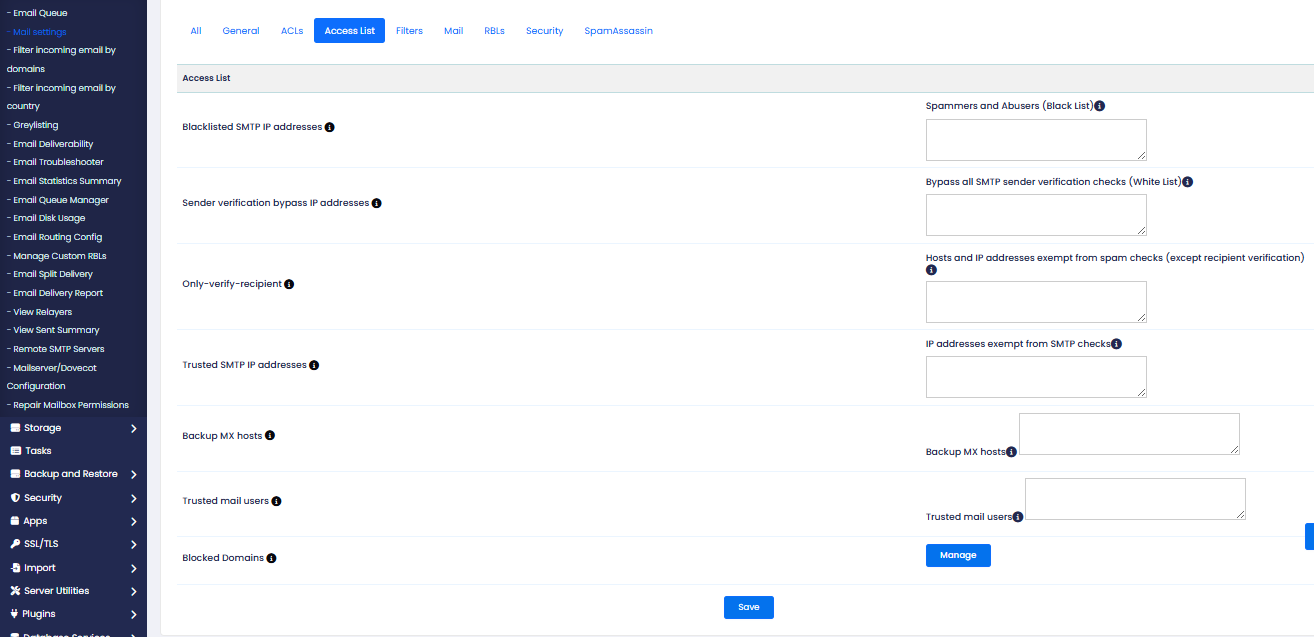
Blacklisted SMTP IP addresses→ Blocks specified IP addresses from sending emails through the mail server
Sender verification bypass IP addresses→ Allows specified IP addresses to bypass sender verification checks.
Only-verify-recipient→ Performs verification only for email recipients without validating the sender
Trusted SMTP IP addresses→ Defines trusted mail servers allowed to send emails with reduced restrictions.
Backup MX hosts→ Specifies backup mail exchanger servers allowed to relay emails for hosted domains.
Trusted mail users→ Lists email users permitted to send mail without strict authentication checks.
Blocked Domains→ Prevents sending or receiving emails from specified domains.
Filters
These settings allow you to select and configure filters that can block spam and potentially dangerous attachments.
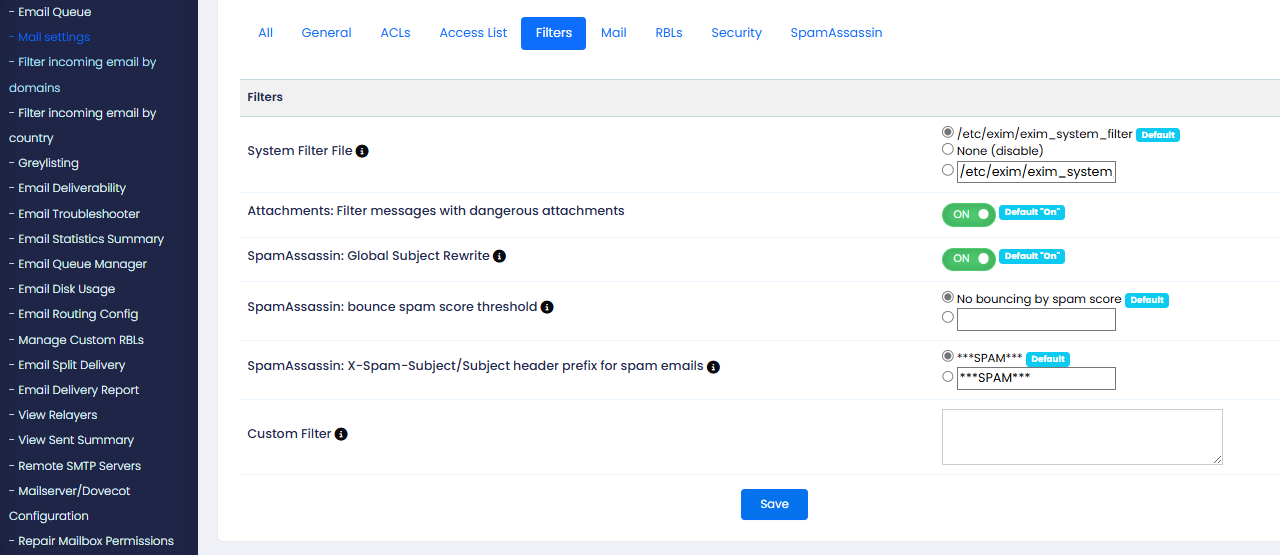
System Filter File→ Defines the global Exim filter file used to apply server-wide email filtering rules.
Attachments: Filter messages with dangerous attachments→ Blocks or filters emails containing potentially harmful file attachments.
SpamAssassin: Global Subject Rewrite→ Modifies the email subject line globally when a message is identified as spam
SpamAssassin: bounce spam score threshold→ Automatically rejects or bounces emails when the spam score exceeds the defined limit.
SpamAssassin: X-Spam-Subject/Subject header prefix for spam emails→ Adds a predefined prefix (e.g., SPAM) to the subject line of detected spam emails.
Custom Filter→ Allows administrators to create custom email filtering rules based on specific conditions.
These settings allow you to configure specific mail server behaviors. For example, enabling sender rate logging in the Exim mainlog helps monitor email activity and identify potential issues or spam sources.
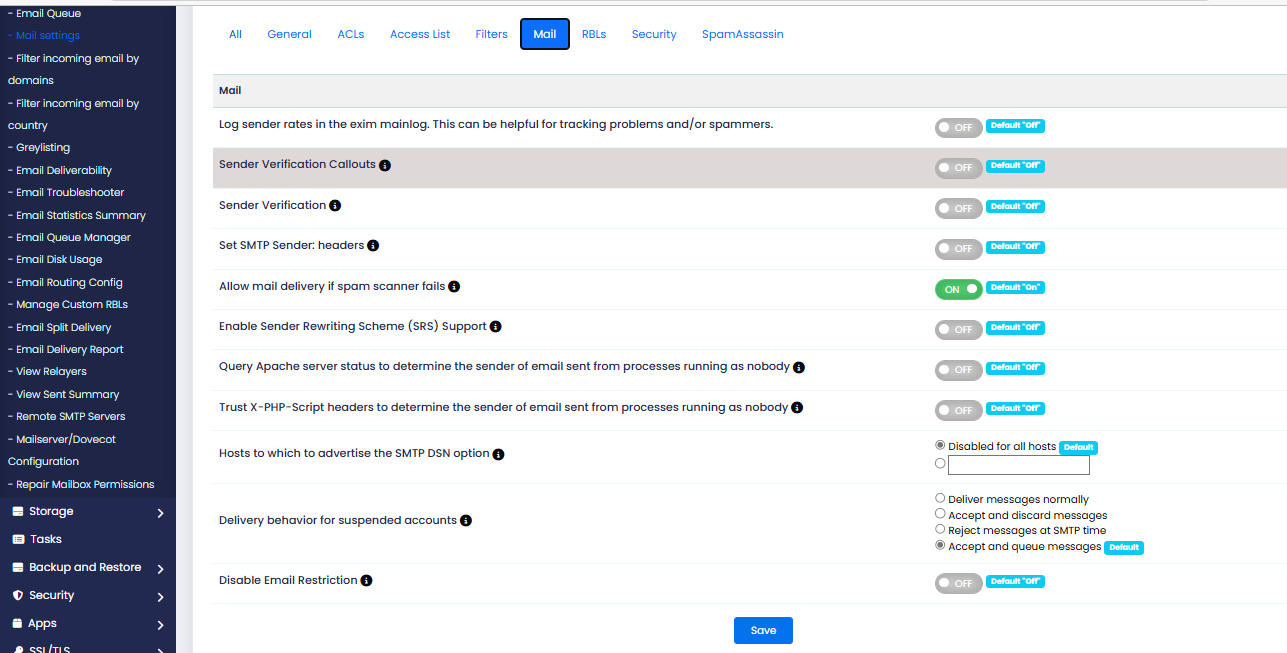
Log sender rates in the exim mainlog. This can be helpful for tracking problems and/or spammers.→ Records email sending rates in logs to help identify spam activity or mail delivery issues.
Sender Verification Callouts→ Verifies sender addresses by contacting the sender’s mail server before accepting the email.
Sender Verification→ Checks whether the sender email address exists and is valid before accepting messages.
Set SMTP Sender: headers→ Adds or modifies SMTP sender-related headers for better mail tracking and identification.
Allow mail delivery if spam scanner fails→ Allows email delivery even if the spam filtering service encounters an error.
Enable Sender Rewriting Scheme (SRS) Support→ Allows email delivery even if the spam filtering service encounters an error.
Query Apache server status to determine the sender of email sent from processes running as nobody→ Uses Apache server status information to identify which website/script sent emails under the “nobody” user.
Trust X-PHP-Script headers to determine the sender of email sent from processes running as nobody
→ Uses X-PHP-Script headers to track the originating PHP script responsible for sending emails.
Hosts to which to advertise the SMTP DSN option→ Specifies remote hosts to which the server advertises Delivery Status Notification (DSN) support.
Delivery behavior for suspended accounts→ Defines how incoming emails are handled for suspended email accounts (reject, discard, or queue).
Disable Email Restriction→ Defines how incoming emails are handled for suspended email accounts (reject, discard, or queue).
Default/catch-all forwarder destination→ Sets the email address that receives messages sent to non-existent addresses within a domain.
RBLs
These settings allow you to configure your mail server to check incoming mail against the available Real-time Blackhole Lists (RBLs). Your server blocks the incoming messages if the IP address or hostname matches an RBL entry.
RBL servers store lists of spam-heavy IP addresses and hostnames so that you can easily block them.
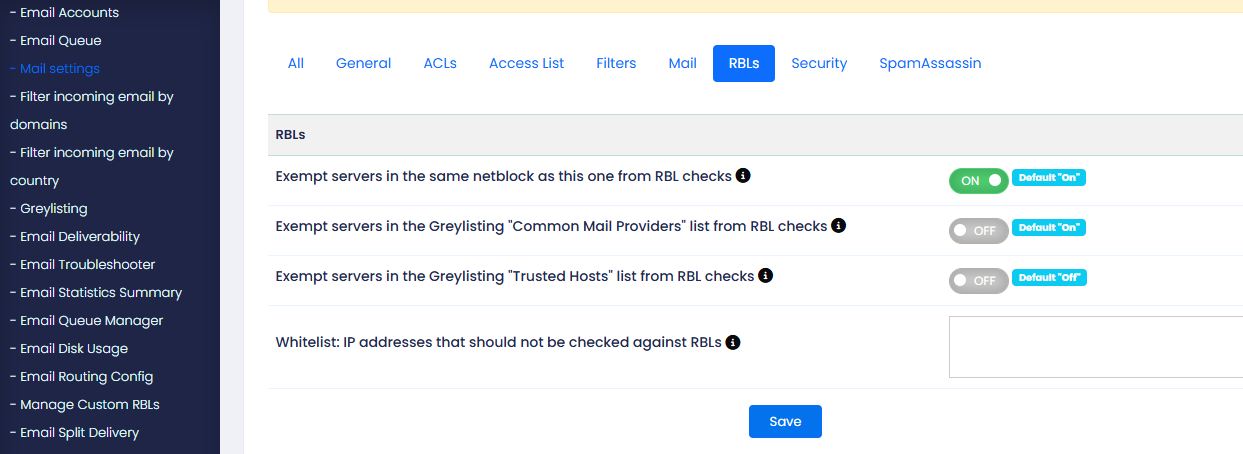
Exempt servers in the same netblock as this one from RBL checks→ Skips RBL (Realtime Blackhole List) spam checks for servers within the same IP network range.
Exempt servers in the Greylisting "Common Mail Providers" list from RBL checks→ Prevents RBL verification for well-known mail providers included in the Common Mail Providers greylist.
Exempt servers in the Greylisting "Trusted Hosts" list from RBL checks→ Excludes trusted hosts defined in greylisting settings from RBL blacklist validation.
Whitelist: IP addresses that should not be checked against RBLs
→ Specifies IP addresses that bypass all RBL blacklist checks during email acceptance.
Security
These settings allow you to configure security settings for your mail server.
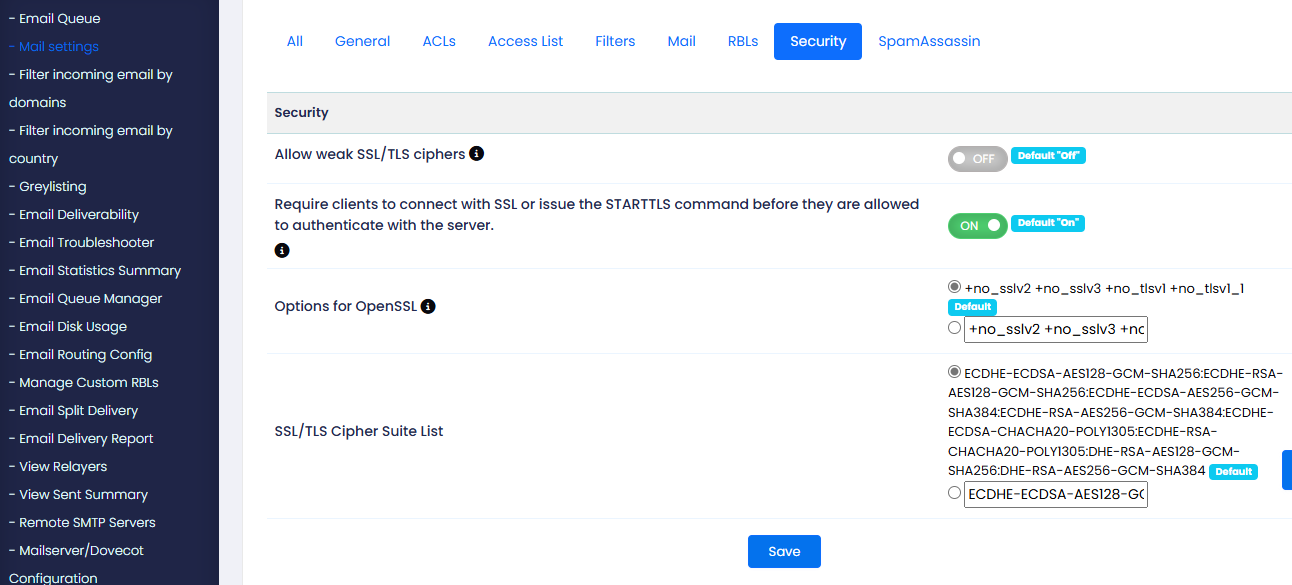
Allow weak SSL/TLS ciphers >> These options manage how secure connections are handled by the mail server. You can choose to allow weak SSL/TLS ciphers (not recommended due to PCI non-compliance) and enforce that clients must use SSL or STARTTLS before authentication. By default, weak ciphers are disabled, and secure connections are required.
Options for OpenSSL >> This setting configures SSL and TLS protocols in OpenSSL that Exim will use to securely communicate with client software. Either select the default setting or enter a space-separated list of protocols that you wish to disallow in the text box.
SSL/TLS Cipher Suite List >> This setting allows you to configure the cipher suites in OpenSSL that Exim uses to securely communicate with client software. Either select the default setting or enter a cipher suite that you wish to use.
SpamAssassin
SpamAssassin is an intelligent spam filtering system used to identify and filter out unwanted or malicious emails. It works by analyzing email content and assigning a spam score based on various rules and criteria.
Key Configuration Options:
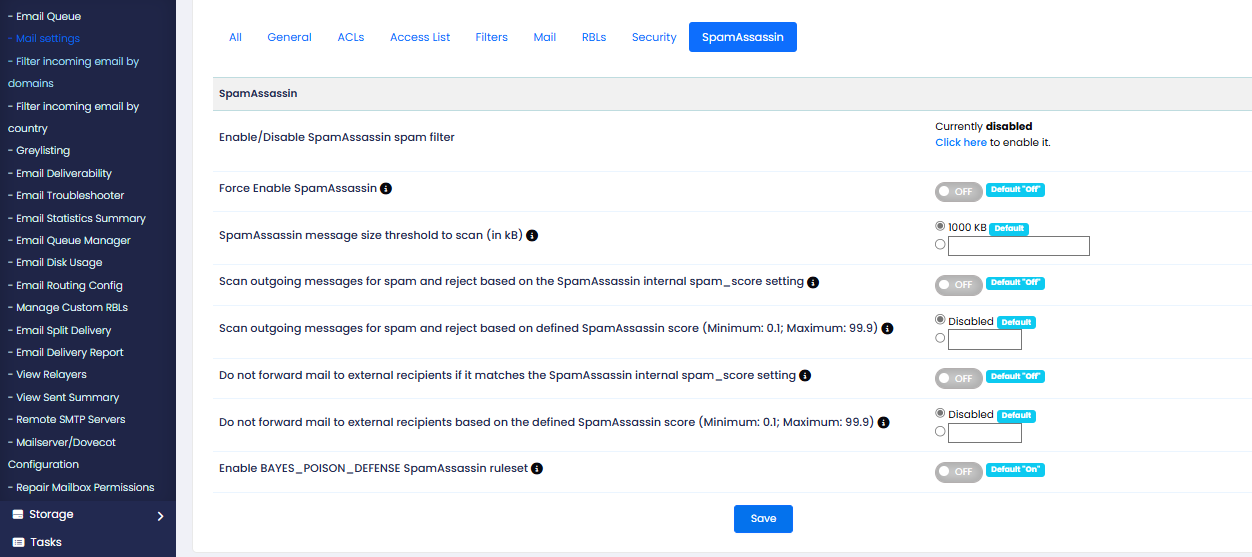
Enable/Disable SpamAssassin:>>Activates the spam filtering system. (Currently disabled by default.)
Force Enable SpamAssassin >>This setting enables SpamAssassin for all accounts on the server, preventing users from disabling it. By default, this option is turned Off.
SpamAssassian message size threshold to scan (in KB) >> This setting allows you to set the maximum size, in kilobytes (KB), for messages that SpassAssian scans. it is generallu inefficient to scan large messages because spam message are typically small (4 KB or smaller).
This settings defaults to 1000KB
Scan outgoing messages for spam and reject based on the SpamAssassin internal spam_score setting>>
This setting enables SpamAssassin to scan outgoing emails and reject them if they exceed the system's internal spam score threshold. It helps prevent compromised accounts from sending spam and protects the server’s reputation.
Scan outgoing messages for spam and reject based on defined SpamAssassin score (Minimum: 0.1; Maximum: 99.9)>>
This setting lets you define a SpamAssassin score threshold for rejecting messages sent to external (non-local) domains. Enter a value between 0.1 and 99.9 (one decimal place only) to activate this filter.
Do not forward mail to external recipients if it matches the SpamAssassin internal spam_score setting>>
This setting allows SpamAssassin to scan messages in the forwarder queue and reject those with a spam score higher than the internal threshold (default: 5). This helps prevent spam from being forwarded through your server.
Default setting: Off
Do not forward mail to external recipients based on the defined SpamAssassin score (Minimum: 0.1; Maximum: 99.9)>>
Set a SpamAssassin score threshold to reject forwarded emails to non-local domains. Enter a value between 0.1 and 99.9 (one decimal place).
Default setting: Disabled
Enable BAYES_POISON_DEFENSE SpamAssassin ruleset>> This setting activates the BAYES_POISON_DEFENSE ruleset in SpamAssassin, which helps prevent spammers from manipulating the Bayesian filter by poisoning it with false spam data. Enabling this rule improves the accuracy of spam detection.
Default setting: On