
Overview
This feature shows the current disk usage and server’s current partition.
Webuzo Admin Panel > System Health > Current Disk Usage
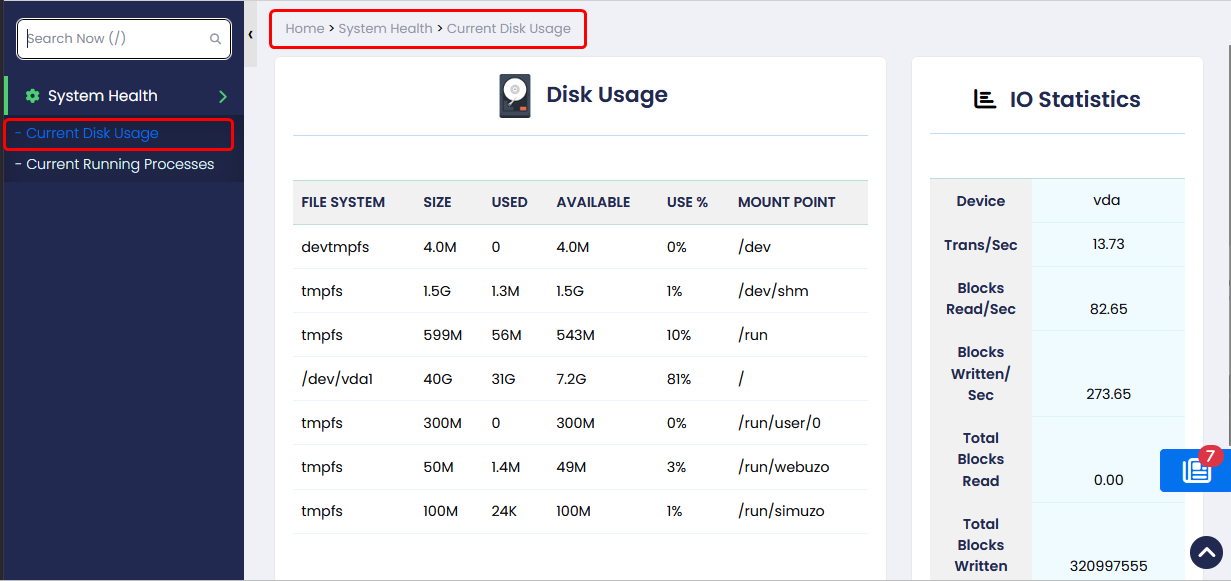
Disk Usage
File System :- This is the name of each particular drive. This includes physical hard drives, logical (partitioned) drives, and virtual or temporary drives.
Size :- The size of the filesystem.
Used :- Amount of space used on each filesystem.
Available :- The amount of unused (free) space on the filesystem.
Use :- Shows the percent of the disk used.
Mount Point :- This is the directory where the file system is located.
IO Statistics
Device :- The device/partition name is listed in /dev directory.
Trans/Sec :- The number of transfers per second that were issued to the device. Higher tps means the processor is busier.
Blocks Read/Sec :- It shows the amount of data read from the device expressed in a number of blocks (kilobytes, megabytes) per second.
Blocks Written/Sec :- The amount of data written to the device expressed in a number of blocks (kilobytes, megabytes) per second.
Total Blocks Read :- It shows the total number of blocks read.
Total Blocks Written :- It shows the total number of blocks written.