
Overview
The Update Settings section allows you to manage automatic updates for Webuzo, the operating system, and applications, along with update notifications.
Home > Settings > Update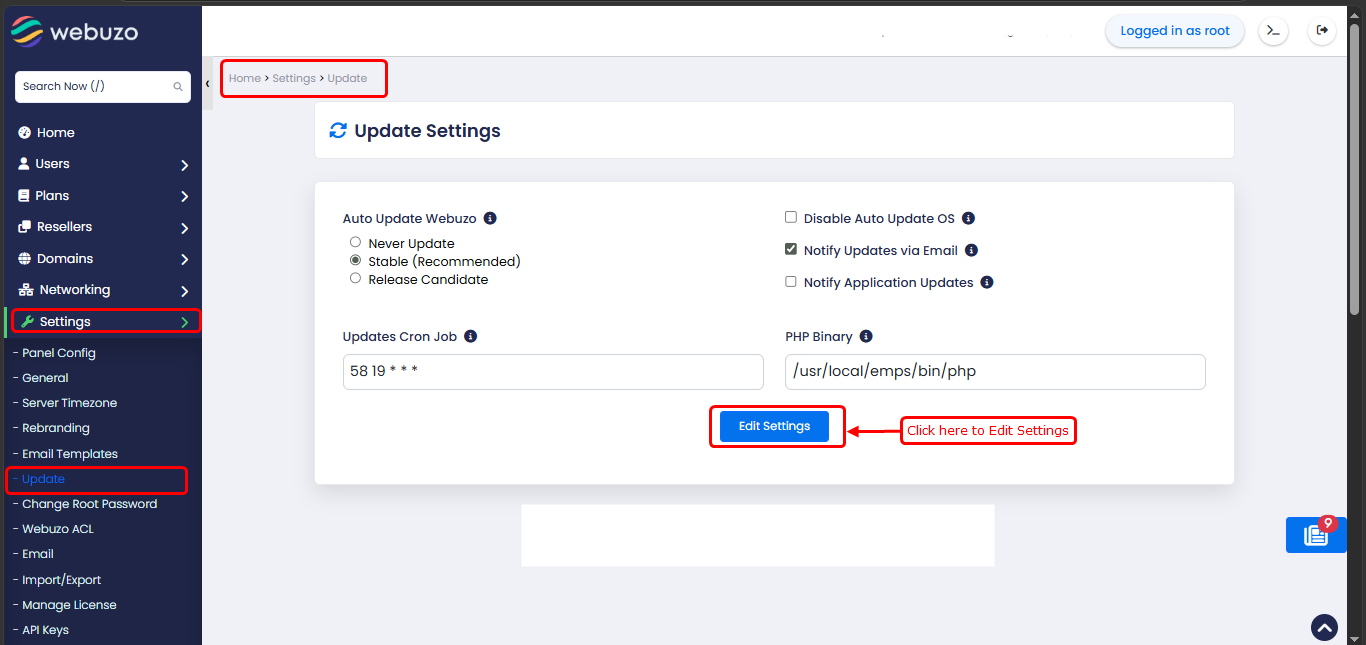
1) Auto Update Webuzo-
Choose how Webuzo should be updated:
Enable this option to prevent automatic operating system updates.
3)Notify Updates via Email-
Enable to receive email notifications when Webuzo updates are available.
4)Notify Application Updates-
Enable to receive notifications for available application updates.
5)Updates Cron Job-
This cron job handles automatic update checks and executions.
6)PHP Binary-
Specifies the PHP binary path used for executing update-related scripts.
Choose how Webuzo should be updated:
- Never Update – Disables automatic updates
- Stable (Recommended) – Updates to stable and tested versions
-
Release Candidate – Updates to testing versions (may include new features but less stable)
Enable this option to prevent automatic operating system updates.
3)Notify Updates via Email-
Enable to receive email notifications when Webuzo updates are available.
4)Notify Application Updates-
Enable to receive notifications for available application updates.
5)Updates Cron Job-
This cron job handles automatic update checks and executions.
6)PHP Binary-
Specifies the PHP binary path used for executing update-related scripts.